The short version
Problem
Printer powder must be round and clean. Checking it takes a machine that only sees size, or hours of counting by hand.
What I built
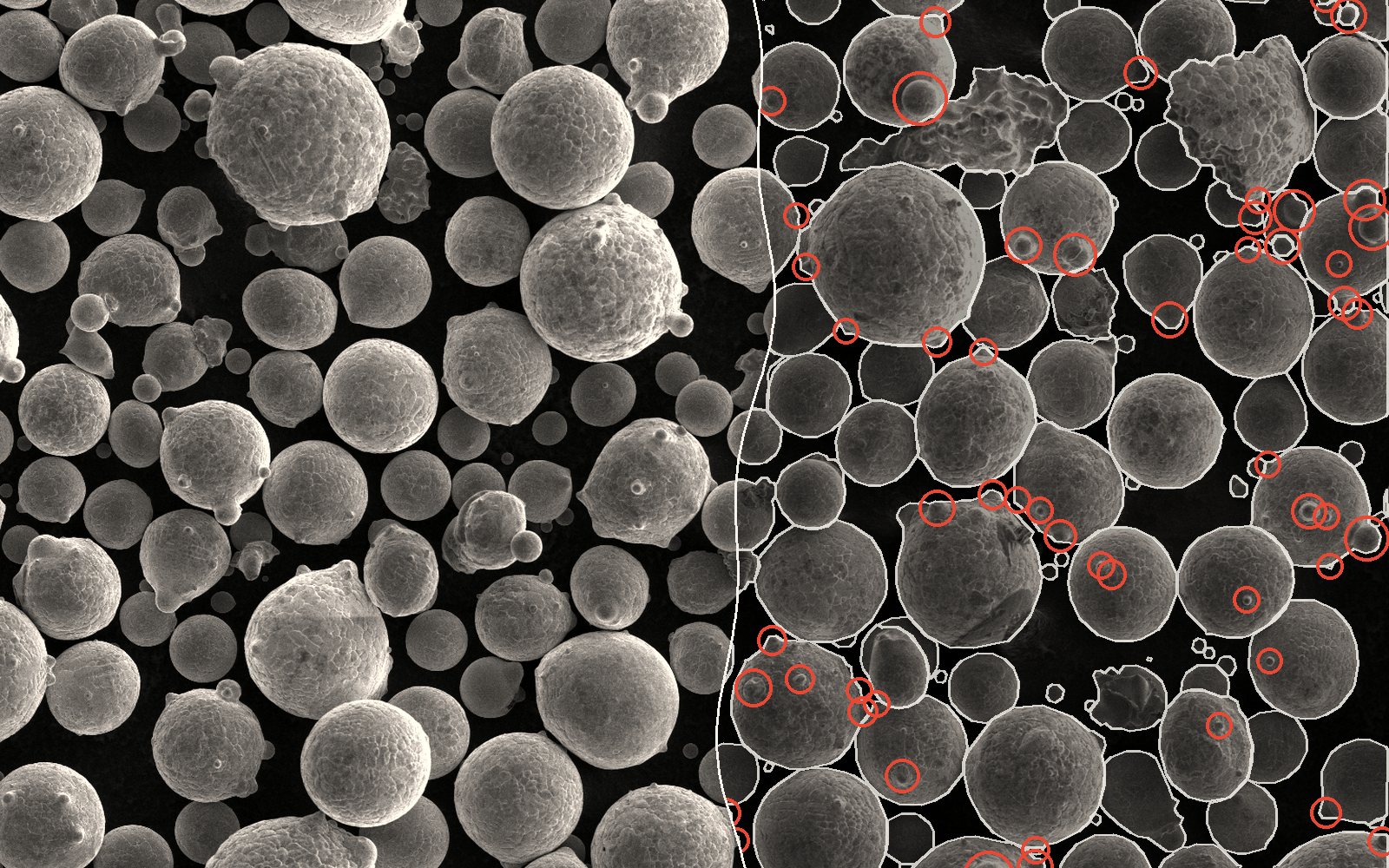
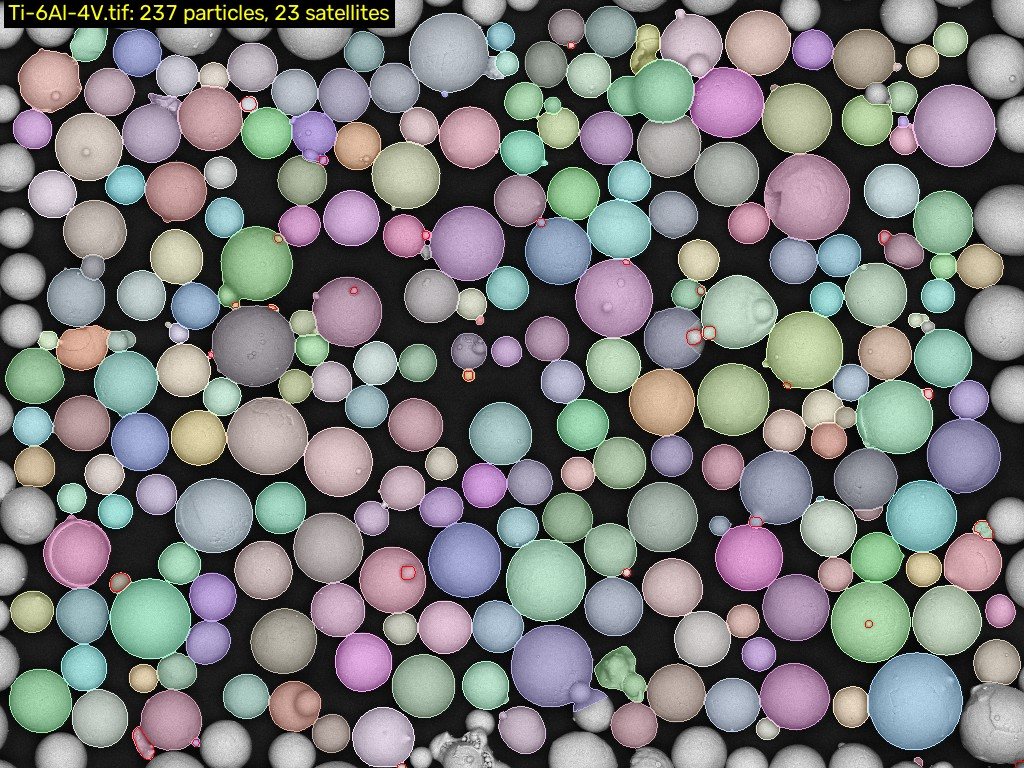
A tool that outlines every particle in a microscope image, finds the satellites, and says whether two batches really differ.
Result
Finds 93% of particles (the published method: 80%) at the same precision. Satellites: good for before vs after, not yet for exact counts.
01Good powder is round. Bad powder has satellites.
what I was thinking A sizing machine tells you how big the particles are and nothing about their shape. A microscope image shows the shape, but someone has to sit and count. Could the image alone do both jobs?
Metal 3D printers melt thin layers of powder with a laser or an electron beam. At CAMAL (NC State’s Center for Additive Manufacturing and Logistics) I help make that powder: a jet of gas blasts molten metal apart, and the droplets freeze in flight.
Good droplets freeze round, about 15 to 53 µm across. Bad ones grow satellites, little particles welded onto big ones that make the powder flow and pack worse.
The usual check, laser diffraction, assumes every particle is a sphere and only reports size. A scanning electron microscope (SEM) shows the real shapes, but an operator gets maybe 20 to 60 images in two hours, and then someone has to measure them. The lab had about 1,000 SEM images just sitting there.
02Your turn: spot the satellites
What I was thinking: Satellites are the hard part. The easiest way to show why is to let you try.
A real SEM image the model never trained on, where a human labeler marked 24 satellites. You get 30 seconds: tap every small particle stuck onto a bigger one (tap a mark again to undo it).
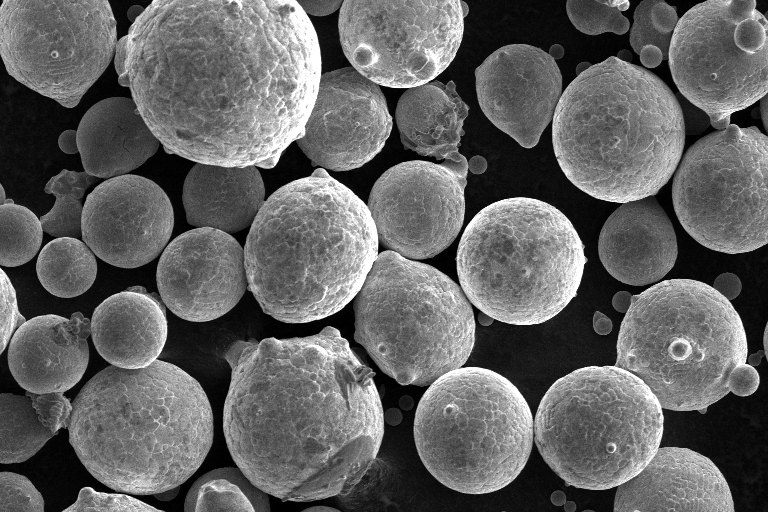
Notice the red rings the human skipped? Most sit on loose fines in the background, not stuck to anything. Over the whole image the model rings 125 to the human’s 88. Hold that thought for step 06.
03Plan first, starting with what could kill it
What I was thinking: Before I write anything, what would have to be true for me to believe this tool, and which unknowns could kill the whole project? Find those first.
So before any code, I wrote down the unknowns that could sink it:
- Does the lab already have a script, or a commercial license?
- Can I get laser diffraction on the same batch?
- Do atomizer run logs exist?
- Which runs, operators and settings made the 1,000 images?
- Can the SEM tile images automatically?
One idea I parked on purpose: predicting the powder from atomizer settings. The sample size there is runs, not images, and 10 to 50 runs is a regression problem, not machine learning.
Open the whole planning map
Read left to right. Hover or tap an item to see what it connects to.
Kill these first
Tasks
Evidence I would need
The point
04Attempt one: cheap, classic, and fooled by a µ
What I was thinking: Start with the simplest thing that could work, and test it where I know the right answer before I test it where I do not.
Version one ran on a laptop: a textbook outlining method (watershed), a scale bar reader, and standard size and shape math. I tested it on synthetic powder where the answer is known, then on real powder with lab measurements.
+8% / −1%
median and 90th percentile size vs lab values, real Ti-6Al-4V, no tuning
~1 s
per image on a laptop CPU
0.48
F1 score on satellites. Better than zero, where it started.
What broke
The text reader read “100 µm” as “100 Hm”, so every image came out in pixels. Fix: any one or two letters before the m count as µm. No SEM bar says km.
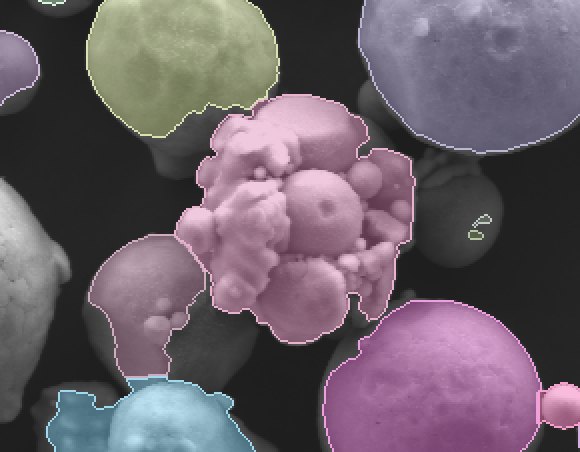
A cluster of satellites and fines got measured as one big, lumpy particle (below).
One frame held just 29 whole particles, so the median read 8% to 25% low. New rule: 300 or more particles per batch, from 5 to 10 random fields.

05Attempt two: a shoot out on the library GPU
What I was thinking: The classic method has hit its ceiling on small and touching particles. A modern segmentation model should beat it, but I will not take that on faith. Run a shoot out.
Four contenders, ranked by one score I fixed before seeing any results:
| Model | Score | Seconds per image |
|---|---|---|
| Cellpose-SAM, auto rescale | 0.835 | |
| Segment Anything, everything mode | 0.833 | |
| Cellpose-SAM | 0.831 | |
| Watershed (attempt one) | 0.730 |
Cellpose-SAM won, nearly tying Segment Anything at a sixth of the time. It still found only 17% to 67% of the tiniest particles, so fine tuning went on the list.
The best bug of the project
The GPU sits on a library workstation with no admin rights, so the whole install became one line pasted into PowerShell. Rehearsing it on my laptop, GPU memory ran out and the NVIDIA driver quietly spilled into system RAM instead of failing: ten minutes of crawling, and a page file that ate 9 GB of disk. Fix: cap PyTorch at 92% of GPU memory so running out is a clean error, then retry at a smaller setting automatically.
06Then the question changed
What I was thinking: The lab does not need a perfect absolute number. They need to know if the powder changed after they changed the atomizer, and how sure they can be. That is a different, and more useful, question.
The lab’s goal became quality control: did roundness and satellites change after an atomizer jet change? That changed three things:
- Train on what exists: public hand labeled sets, 28 images and 2,248 satellite outlines, instead of waiting on our own labels.
- Report differences with error bars: a 95% range from 1,000 resamples, and a verdict.
- Pick the satellite model by its count, not just its score, because a QC report is a count.
A test run on two public powders, plain Ti-6Al-4V vs blends with 15% and 20% copper:
| Metric | Ti-6Al-4V → with Cu | Verdict |
|---|---|---|
| Round (sphericity ≥ 0.90) | 80.5% → 65.4%−15.1 points, 95% range −21.7 to −8.3 | Changed |
| Carrying a satellite | 5.1% → 10.7%+5.6 points, 95% range +1.7 to +9.3 | Changed |
| Median size, by count | 25.5 → 19.8 µm−5.7, 95% range −7.4 to −4.1 | Changed |
| 90th percentile size | 38.0 → 37.6 µm−0.4, 95% range −2.9 to +1.9 | No detectable change |
Copper made the powder less round with twice the satellites, and the big end of the size range did not move. That is exactly what a before and after check needs to say.
The fine print
The training sets are AMPIS and SALAS. The satellite model is picked among those within 0.02 F1 of the best, by whose count lands closest to the truth.
There are one or two images per powder here, so the ranges come from resampling particles and are on the optimistic side. With three or more images per batch, the tool resamples whole images instead.
07How good is it?
Scored on published hand labeled images, against the paper those labels come from (Cohn 2021):
0.93
of particles found, at 0.94 precision. The published method: 0.80, at the same precision.
0.64
of satellites found, at 0.67 precision. Published: 0.55, at 0.69.
~5 s
per image on a GPU. Training takes about 75 minutes on the library’s 8 GB card.
The trained models ship as a 1.4 GB public release the installer downloads, so no other PC has to train anything.
08What I do not trust yet, and what is next
Do not trust yet
- Satellite counts run 15% to 20% high or low depending on the powder. Trust the change between batches, not the absolute number.
- All training was on public powders, not yet on our own SEM.
- A photo is a 2D view of a 3D pile, so buried particles read small.
- Agreement with laser diffraction on our own batches is unproven (unknown U2 on the map).
Next
- Run it on the lab’s own images and hand check a few.
- Get laser diffraction on the same batches.
- Fine tune on our own powder; the labeling tool is ready.
- Atomizer settings vs powder, once run logs exist.
Credits
Training data: AMPIS (Cohn et al. 2021) and SALAS (Price et al. 2021), both MIT licensed; micrographs from Ames Laboratory and ORNL MDF. Test images: AA7075 plus TiC, Mendeley Data 42gzbgk5hb (CC BY 4.0); Ti-6Al-4V and Cu, Strauch, Altmann and Tönjes, Zenodo 17037765 (CC BY-SA 4.0); synthetic renders by DeCost and Holm (CC BY 4.0). Models: Cellpose-SAM (Pachitariu, Rariden, Stringer), Mask R-CNN via torchvision, Segment Anything (Meta AI).