The short version
The idea
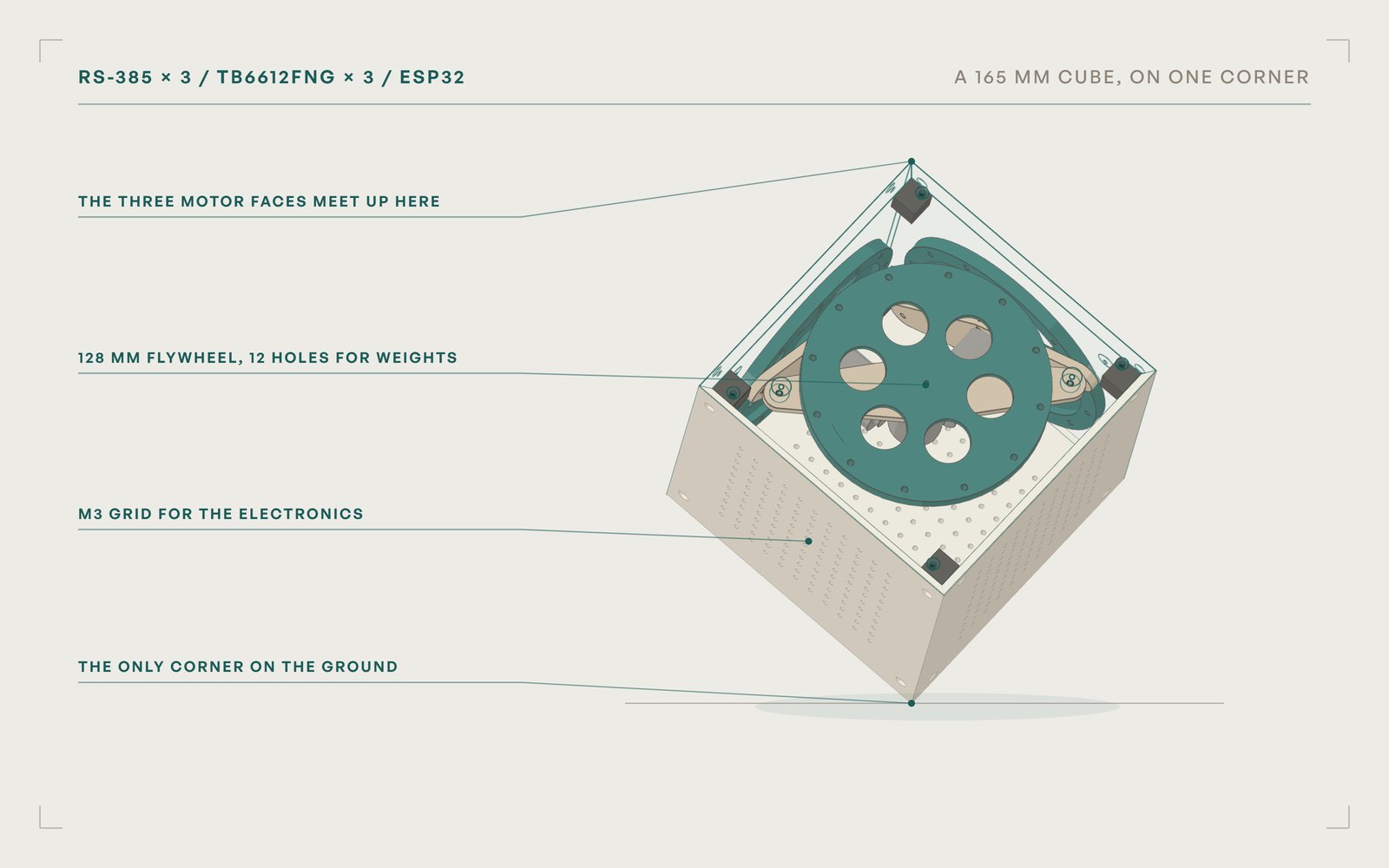
Stand a cube on one corner and keep it there. Spin a wheel inside one way and the cube twists the other way. Three wheels, three directions.
The hard part
It falls in about half a second, the motors came loosely specified, and everything has to fit inside 165 mm.
What I built
A shell that checks its own fit, faces with an inlaid drawing that print in one go, and a full wiring and power plan for the electronics.
01Spin a wheel one way, the cube twists the other
what I was thinking Nothing touching the ground but one corner. If spinning a wheel one way twists the cube the other way, three wheels at right angles should be able to hold it there.
It is the same trick spacecraft use to point without firing thrusters: a reaction wheel. Speed a heavy wheel up and the body it is bolted to turns the opposite way. A research group at ETH Zurich made a cube that stands on its corner this way, the Cubli. I wanted to build my own.
On an edge, one wheel is enough to fight one way of falling over. On a corner, the cube can fall in any direction, so it takes three wheels, each on its own face, and a computer reading a gyro fast enough to catch the fall before it starts.
02Your turn: keep it standing
What I was thinking: The physics is easier to feel than to read.
This is the cube balancing on one edge, seen from the side, with one of its wheels. Hold a button (or the arrow keys) to spin the wheel and push the cube back up. Start in slow motion.
Press start, then keep it upright.
Times count cube seconds, not your seconds.
At real speed, a one degree lean becomes a thirty degree fall in about half a second. That is faster than a person can react, which is why the cube needs a controller reading the gyro many times a second. Notice the wheel speed bar, too: push one way for too long and the wheel runs out of speed to give, and the cube goes over anyway.
The fine print
It is a one wheel model of this cube on an edge: 165 mm, about 1 kg, a 128 mm PLA wheel with its 12 weight holes filled, and an RS-385 assumed to stall at 0.12 N·m and spin freely at 6000 rpm. With those numbers it can only hold itself up from about 5 degrees of tilt.
The demo controller is an LQR that can see the wheel’s speed. The RS-385s have no encoders, so on the cube that takes a hall sensor and a magnet per wheel, about $1 each.
03Buy the parts first, then design around them
What I was thinking: Get the cheap parts on the way first. The shell should fit what actually shows up, not what a listing promises.
The first order was everything that makes it move and sense:
3
RS-385 brushed motors, 12 V, about 6000 rpm, one per wheel
5
TB6612FNG dual motor drivers, so there are spares
~$23
for the motors, the drivers and an MPU-6050 gyro and accelerometer together
An ESP32 runs it, and a 3S lithium polymer pack powers it. Then, with the parts on the way, came the shell.
04A shell that checks its own fit
What I was thinking: The motor listings disagree with each other. So the shell should be a script I can rerun with real measurements, not a drawing I would have to redo.
The shell is a Python script that builds every part from a dozen parameters. The three motor faces meet at one corner. Each motor hangs from a bridge with its shaft toward its own face, so the wheel spins 1.5 mm inside the panel and the motor tails point at the middle of the cube. The three plain faces carry a grid of M3 holes for the electronics. The panels have 45° mitered edges and screw into eight corner blocks.
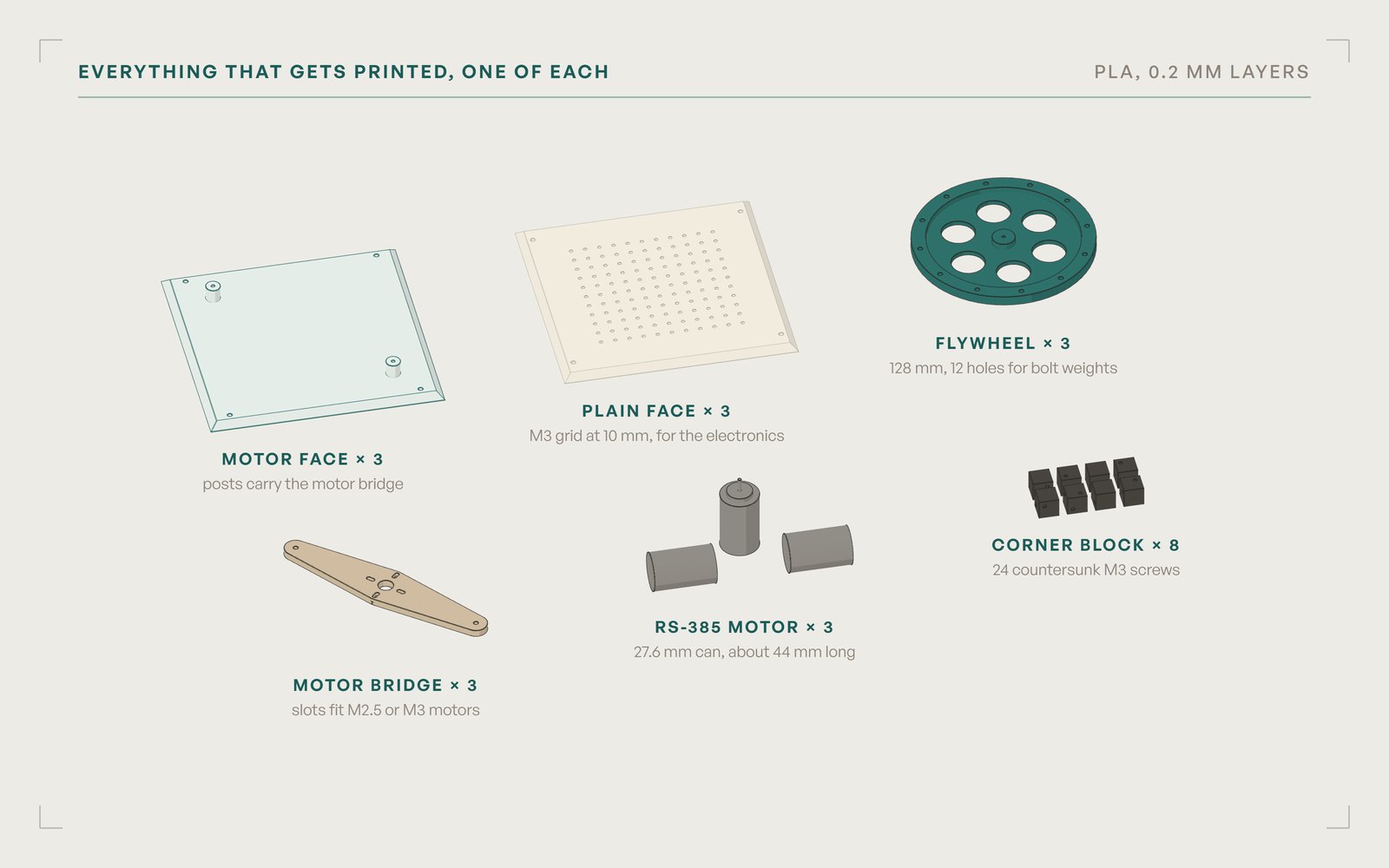
The catch is the middle. The three motors point at the same spot, and with a 44 mm can there is only 4.2 mm between one motor’s tail and the next motor. The listings say the can is 56 or 57 mm long with the shaft, the shaft is 2.0 or 2.3 mm, and the thread is M2.5 or M3. So: caliper the real motors, change the numbers at the top of the script, rerun it, and it reports any collisions. Try it:
4.2 mm
between a motor’s tail and the next motor
What will matter once it moves
- Wheel inertia. PLA is light, so the rim has 12 holes for M3 bolts and nuts as weights.
- Shaft grip. A press fit on a smooth 2 mm shaft slips when the motor reverses hard. CA glue over the M2 set screw, or a brass hub.
- Center of mass. The motors pull it toward their corner, so the battery and boards go on the plain faces to pull it back.
The solids come from manifold3d and the checks run in trimesh.
05Make it mine: a drawing in the faces
What I was thinking: If it is going to sit on my desk, it should look like mine.
The three motor faces carry a thumbs-up character, inlaid 0.8 mm deep in a second color. All six faces print in one go on a Prusa XL: the three motor faces outer side down, and the three plain faces stacked in the fourth spot with 0.2 mm air gaps so they peel apart. The second color only shows up in the first four layers, so the tool changes are over quickly.
The fill that leaked
The first filled version of the drawing leaked: the flood fill got inside the figure through gaps in the sketch lines, at the top of the head, the thumb tip and the knuckles. Closing every pair of stroke ends within 3 mm fixed the fist but not a wider break at the shoulder. A morphological closing finally gave a solid silhouette, with the face and finger lines left in the panel color.
06No cable yet, so wire all of it on paper
What I was thinking: I misplaced my USB cable. I do not just want to spin a motor, I want the whole cube wired, so the cable is the last missing piece.
Everything lives on one plain face except the battery, which gets its own, and the motors. That keeps the ten signal wires short, and only the motor and battery leads cross between panels, each through a plug with 5 cm of slack so a panel lifts off without unplugging anything.
Two choices matter most. Each TB6612 board drives one motor with both of its channels tied together, which doubles what it can deliver, from 1.2 to about 2.4 A continuous and 3.2 to about 6.4 A peak, because an RS-385 reversing hard can pull several amps. And all three boards share one standby pin with a 10 kΩ pull-down, so the motors stay off while the ESP32 boots.
Hover or tap a net, or any wire, to light it up.
Pin map and wire lengths
| Connection | ESP32 | Goes to |
|---|---|---|
| Motor X | 25 / 26 / 27 | board 1: PWM / IN1 / IN2 |
| Motor Y | 32 / 33 / 14 | board 2: PWM / IN1 / IN2 |
| Motor Z | 18 / 19 / 23 | board 3: PWM / IN1 / IN2 |
| Standby | 13 | STBY on all three, 10 kΩ to ground |
| IMU | 22 / 21 / 4 | SCL / SDA / INT |
The pins stay clear of the ESP32’s flash and boot mode pins, and of GPIO 16 and 17, which some boards use for extra RAM. PWM runs at 20 kHz, above hearing, so the motors do not whine.
| Run | Length | Wire |
|---|---|---|
| Motor to driver, each, with a plug in the middle | 16 cm | 22 AWG |
| Battery to the electronics panel, XT30 at that end | 15 cm | 20 AWG |
| 12 V bus to the three VM pins, buck and capacitor | 5 to 8 cm | 20 to 22 AWG |
| Buck to the ESP32’s 5 V pin | 6 to 8 cm | 22 AWG |
| ESP32 to the driver signals and standby | 8 to 10 cm | 26 to 28 AWG |
07Is a 450 mAh battery enough?
What I was thinking: Before buying a bigger battery, work out what this one actually gives me.
The pack says 3S, 450 mAh, 80C. That is three cells in series, 11.1 V nominal and 12.6 V full, about 5 Wh in all. The 80C means it can push 80 times its capacity: 36 A. The cube will never ask for that, but a short circuit would get it, which is why a 5 A fuse sits right after the battery.
Rough runtimes, using 360 of the 450 mAh:
| Doing | Average draw | Minutes, 0 to 60 |
|---|---|---|
| Balancing on an edge | 0.4 to 0.8 A | |
| Balancing on a corner, well tuned | 0.5 to 1 A | |
| Jumping up, badly tuned | 2 A or more |
Just switched on, it would idle for about six hours. So the answer is no bigger battery yet: tuning happens in five minute bursts, and at about 40 g the 450 barely moves the center of mass of a cube that weighs close to a kilogram.
The fine print
Nothing in the cube protects the pack from running itself flat, so two resistors (100 kΩ and 22 kΩ) bring the battery voltage down to something the ESP32 can read on GPIO 34, and the motors cut out at 10.5 V, 3.5 V per cell.
A light inside would shine out through the grid holes: a dozen WS2812B LEDs at a third of full brightness draw about 0.1 A, roughly 10 to 15% of the runtime.
08Before the first power-up
What I was thinking: A pack that can push 36 A will melt a jumper wire faster than I can unplug it. Check everything twice, with the battery out.
The first program is a bring-up sketch, not a balancer. Over the serial monitor, r x ramps motor X both ways, x 100 holds a speed, s stops everything and i streams the gyro’s tilt angles. Speed is capped at 200 of 255 while testing. Before any of that runs: